How to import your existing life list into Trip Tick
Starting fresh doesn’t mean losing your history. Here’s how to bring your existing sightings into Trip Tick so your life list total is accurate from the very first day.
Before you start
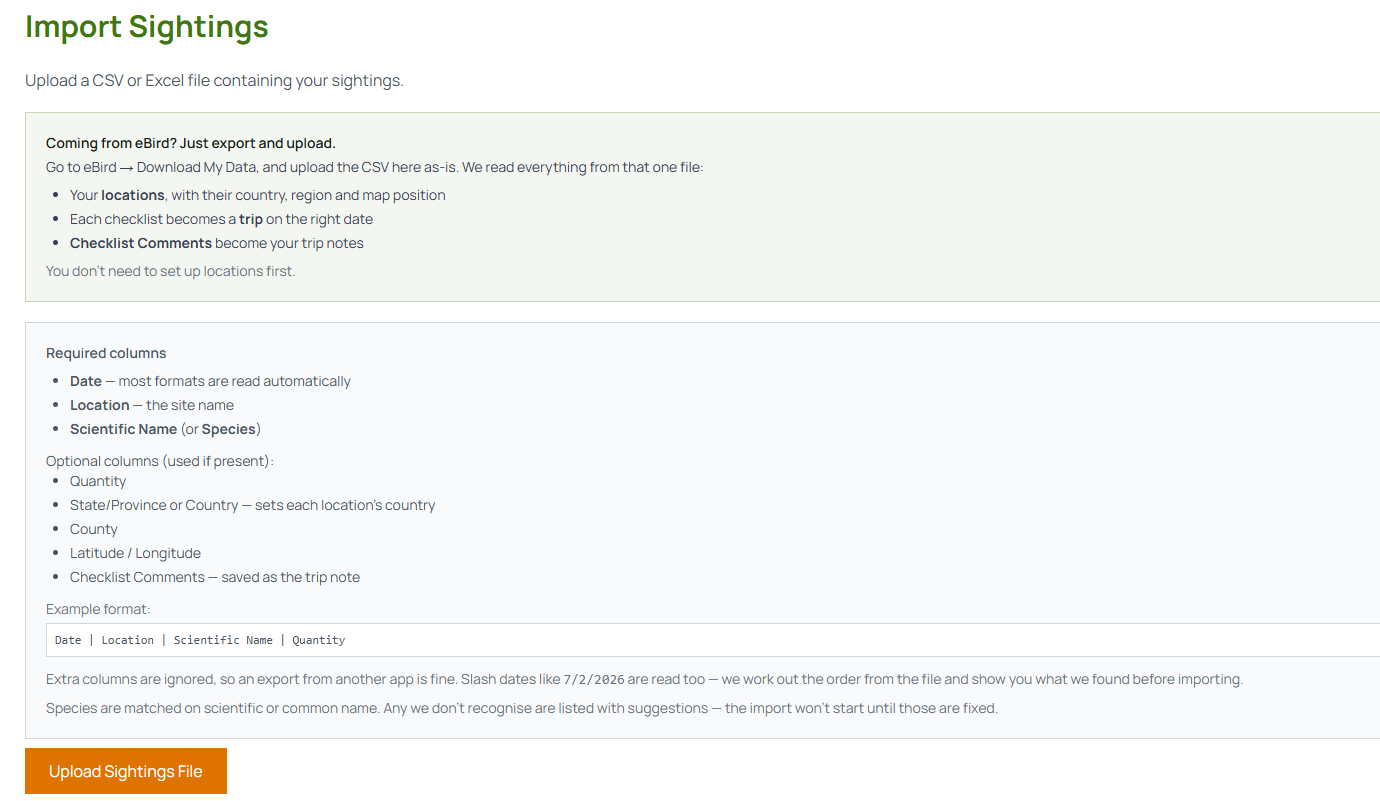
Gather your records into a single spreadsheet — CSV or Excel both work. Trip Tick needs three columns for each sighting: Date, Location, and Scientific Name (or Species). Quantity, Latitude and Longitude are optional extras. If your records are scattered across notebooks or several apps, it’s worth consolidating them into one file first.
Importing from a spreadsheet
Open Import Trips under Trips in the menu, then upload your CSV or Excel file. Trip Tick reads your columns by their headers and shows a preview plus a summary of how many rows and species it matched. Any species it doesn’t recognise are listed — often with a “did you mean…” suggestion — so you can fix them before importing, and you’ll be asked to confirm any new locations it needs to create.
Importing from another app
Many birding apps let you export your records as a spreadsheet or CSV file. Export from your old app first, then make sure the column headers match what Trip Tick expects — Date, Location and Scientific Name — and run the same Import Trips steps above.
After importing
Once imported, your sightings behave exactly like ones logged directly in Trip Tick — they count toward your life list, your location totals, and (if you’re on Premium) your reports. It’s worth a quick look through Manage My Locations afterwards to check everything matched to your existing locations rather than creating unwanted duplicates.
Tidying up afterwards
- Tidy up locations from Manage My Locations if the same site came in under two different names.
- Add missing counts where you remember them — even rough estimates improve your reports.
- Don’t rush it. Import can be run more than once, so bring across what you have now and add older records as you find them.
Once it’s done, you’ll never need to think about it again — every new trip builds naturally on top of your full birding history.
Import takes a few minutes and means you start with your real total, not zero.
Open Trip Tick →